From voxels to polygons: a tiny greedy mesher in Rust
Reposted from an older blog on another platform, so the garden has it too. The words are as they were; only the formatting is new.
My goal for this project was to generate 3D models purely from code, without making anything ‘by hand’ in a traditional modeling tool. I’m drawn to a simplistic, boxy art style; I feel that working with creative constraints like these inspires more creativity.
To achieve this, voxels provide a fun simple starting point. You can represent shapes in a 3D grid by simply marking each cell as either Solid or Empty. We can choose any size of cell, and the smaller the cells, the more ‘realistic’ the final shape will appear. We can generate these 3D blocky shapes from pure maths and then transform that into a standard 3D mesh of polygons used by modern game engines and tools.
That’s where greedy meshing comes in, a concept I first learned about from Guillaume Robert’s excellent overview of voxel techniques. Instead of creating a separate square for every single visible voxel face, this clever type of greedy algorithm scans the grid and merges adjacent, co-planar faces into the largest possible rectangles. This dramatically reduces the final vertex and triangle count, producing clean meshes that are guaranteed to be “watertight” (no holes).
The pipeline at a glance
- Model: populate a
VoxelGridwith Solid/Empty cells for a shape. - Mesh: run a greedy mesher across X/Y/Z axes to produce quads (then triangles).
- Export/View: either write an OBJ or launch an interactive Bevy viewer.
// export (default): lost-your-marbles <radius> <voxel_size> <out_path>
// view:             lost-your-marbles view <radius> <voxel_size>
Modeling shapes in a VoxelGrid
VoxelGrid is a packed 3D array with voxel_size, extents, and a simple enum.
#[derive(Debug, Clone, Copy, PartialEq, Eq)]
pub enum Voxel {
    Empty,
    Solid,
}

pub struct VoxelGrid {
    pub size_x: usize,
    pub size_y: usize,
    pub size_z: usize,
    pub voxel_size: f32,
    pub data: Vec<Voxel>,
}
Shapes are filled analytically. For a sphere, we mark any voxel whose center
lies within radius r:
for z in 0..size_z {
    for y in 0..size_y {
        for x in 0..size_x {
            let px = (x as f32 + 0.5 - center[0]) * voxel_size;
            let py = (y as f32 + 0.5 - center[1]) * voxel_size;
            let pz = (z as f32 + 0.5 - center[2]) * voxel_size;
            let d2 = px * px + py * py + pz * pz;
            if d2 <= r * r {
                grid.set(x, y, z, Voxel::Solid);
            }
        }
    }
}
We also implemented boxes, cylinders, cones, pyramids, and ramps the same way by checking voxel centers against each primitive’s bounds or profile.
Greedy meshing: fewer quads, clean surfaces
We mesh by scanning 2D slices across each axis. For each slice, we:
- Build a mask of “exposed” faces where a Solid voxel neighbors an Empty one.
- Greedily merge adjacent mask cells into the largest possible rectangles.
- Emit a single quad for each rectangle.
pub fn mesh_voxel_grid(grid: &VoxelGrid) -> Mesh {
    let mut mesh = Mesh::new();
    greedy_axis(&mut mesh, grid, Axis::X);
    greedy_axis(&mut mesh, grid, Axis::Y);
    greedy_axis(&mut mesh, grid, Axis::Z);
    mesh
}
In each slice, we label the face mask with 1 or -1 (front/back) based on
neighbor occupancy:
// Exposed face if solid next to empty along +w
let a = voxel(p.x, p.y, p.z) == Voxel::Solid;
let b = voxel(pn.x, pn.y, pn.z) == Voxel::Solid;
mask[(v * size_u + u) as usize] = match (a, b) {
    (true, false) => 1,  // front face with normal
    (false, true) => -1, // back face, flip normal later
    _ => 0,
};
Once a starting face is found, the algorithm greedily expands first in one direction (width), then the other (height), consuming the mask until it can’t grow any further. We then clear that part of the mask and emit a single, optimized quad.
// Compute width
let mut width = 1;
while u + width < size_u && mask[(v * size_u + (u + width)) as usize] == c {
    width += 1;
}
// Compute height
let mut height = 1;
'outer: while v + height < size_v {
    for x in 0..width {
        if mask[((v + height) * size_u + (u + x)) as usize] != c {
            break 'outer;
        }
    }
    height += 1;
}
Normals and triangle winding remain consistent across axes; each merged rectangle becomes a single quad with proper UVs spanning its dimensions.
A minimal mesh container
We store positions, flat normals, UVs, and indices. Adding a quad pushes 4 verts and 2 triangles.
pub fn add_quad(
    &mut self,
    v0: [f32; 3], v1: [f32; 3], v2: [f32; 3], v3: [f32; 3],
    normal: [f32; 3],
    uv_rect: [f32; 4], // [u0, v0, u1, v1]
) {
    let base = self.positions.len() as u32;
    self.positions.extend_from_slice(&[v0, v1, v2, v3]);
    self.normals.extend_from_slice(&[normal, normal, normal, normal]);
    let [u0, v0u, u1, v1u] = uv_rect;
    self.uvs
        .extend_from_slice(&[[u0, v0u], [u1, v0u], [u1, v1u], [u0, v1u]]);
    self.indices.extend_from_slice(&[base, base + 1, base + 2, base, base + 2, base + 3]);
}
Exporting to OBJ (or viewing interactively)
For offline inspection, we write a simple OBJ with position/normal/UV and per-triangle faces:
// Indices are 0-based; OBJ expects 1-based.
for tri in mesh.indices.chunks_exact(3) {
    let a = tri[0] + 1;
    let b = tri[1] + 1;
    let c = tri[2] + 1;
    // Use same index for v/vt/vn
    writeln!(w, "f {0}/{0}/{0} {1}/{1}/{1} {2}/{2}/{2}", a, b, c)?;
}
For instant feedback, we also built a simple viewer using the Bevy engine. It
converts our custom mesh into a bevy::prelude::Mesh, hooks it up to a
standard PBR material, and drops it into a scene with an orbit camera for easy
inspection.
fn to_bevy_mesh(m: &Mesh) -> BevyMesh {
    let mut mesh = BevyMesh::new(
        PrimitiveTopology::TriangleList,
        RenderAssetUsages::RENDER_WORLD | RenderAssetUsages::MAIN_WORLD,
    );
    mesh.insert_attribute(BevyMesh::ATTRIBUTE_POSITION, m.positions.clone());
    if !m.normals.is_empty() {
        mesh.insert_attribute(BevyMesh::ATTRIBUTE_NORMAL, m.normals.clone());
    }
    if !m.uvs.is_empty() {
        mesh.insert_attribute(BevyMesh::ATTRIBUTE_UV_0, m.uvs.clone());
    }
    mesh.insert_indices(Indices::U32(m.indices.clone()));
    mesh
}
There’s also a gallery mode that spawns multiple primitives with distinct transforms and colors.
Running it
cargo run --release -- 5.0 0.5 voxel_sphere.obj   # export an OBJ
cargo run --release -- view 5.0 0.5               # interactive viewer
cargo run --release -- gallery 0.5                # the shape zoo
Results and tradeoffs
- Compact geometry. Greedy meshing removes internal faces and merges coplanar regions, drastically reducing triangles.
- Perfectly sharp features. Surface-aligned voxels produce crisp edges without smoothing artifacts.
- Deterministic and robust. No ambiguous cases like marching cubes; great for blocky CAD-like shapes and voxel art.
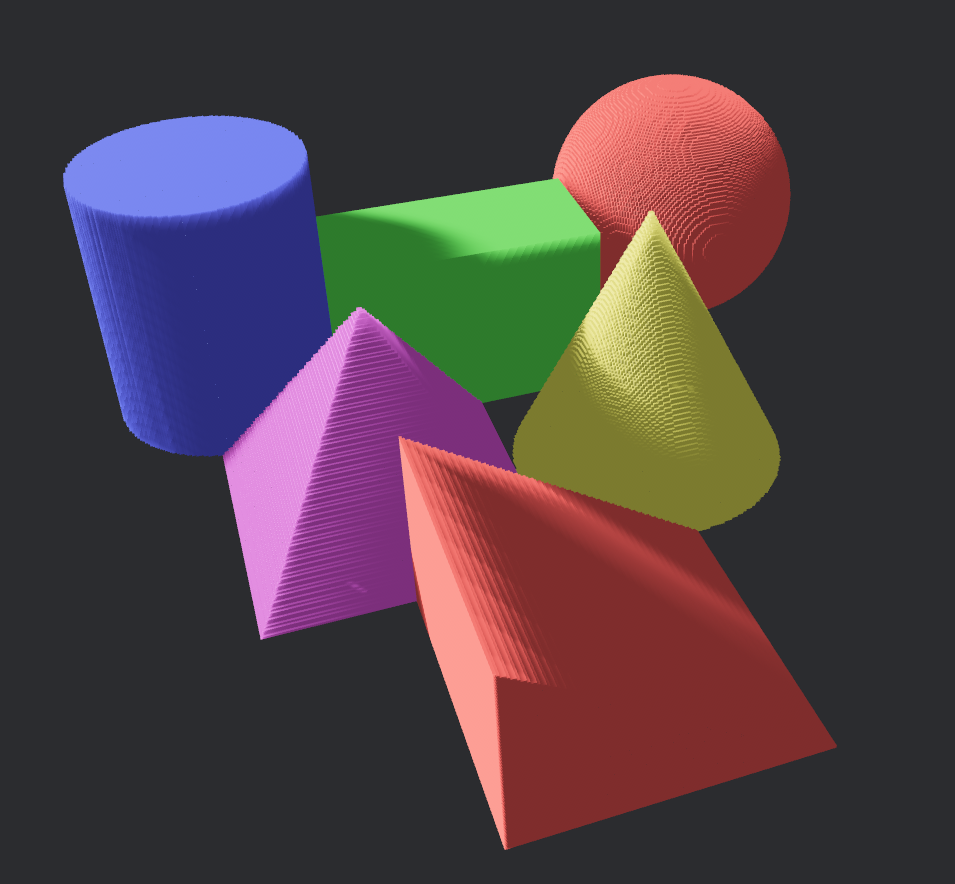
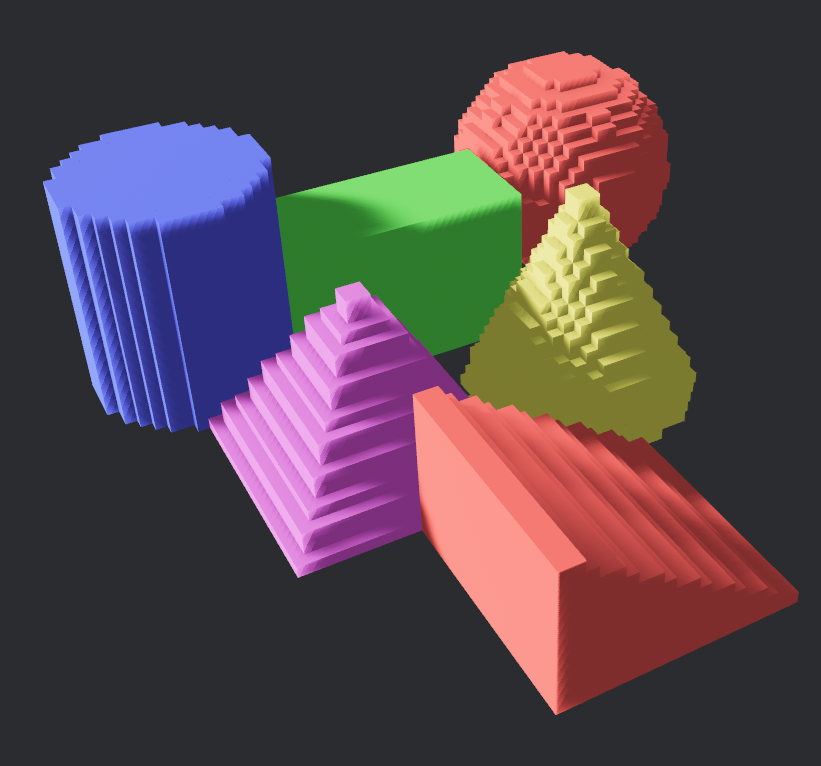
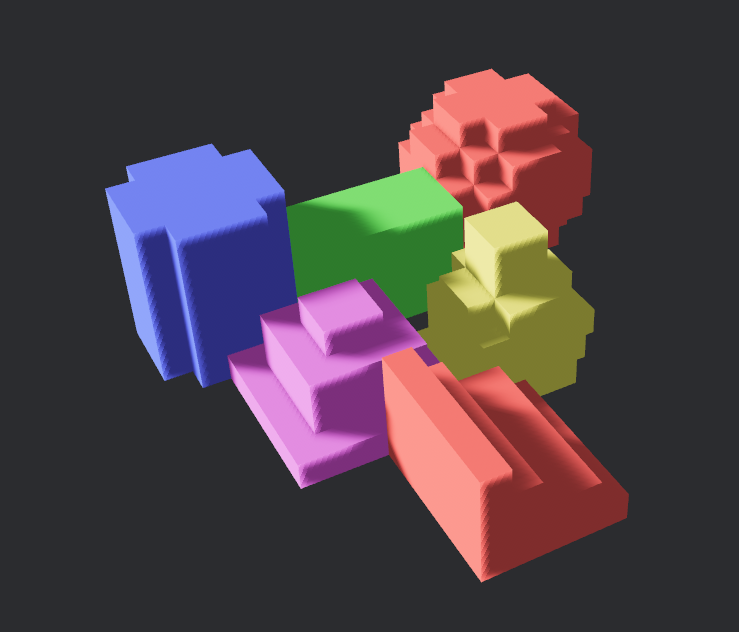
- The voxel look. The primary tradeoff is aesthetic, and it’s directly controlled by the voxel size. A smaller voxel size produces a higher-resolution mesh that follows curves more closely, at the cost of more geometry. A larger size creates a more abstract, blocky look.
The same set of primitives, at three voxel sizes:
Closing thoughts
This project was a fun exploration of just how much you can achieve with a simple, focused algorithm. By combining an analytical approach to modeling shapes with a clean, greedy mesher, we were able to generate robust, lightweight geometry without pulling in any heavy dependencies. The entire pipeline — from defining a shape in a voxel grid to meshing and exporting it — is fast, deterministic, and contained in just a few hundred lines of Rust.
If you’re looking for a way to generate blocky, stylized geometry, this technique is a fantastic and straightforward alternative to more complex surface extraction methods. Happy meshing!
Related: the-meadow-grew-a-map, which is the other Rust-and-Bevy thing here that draws everything from code rather than assets.
linked from
- A marble game that generates its own levelslost-your-marbles is a physics sandbox that turned into a game: you push a marble through procedurally generated levels on a sixty-second ti…
- A marble game still wearing its debug coloursimport hud from './hud.png'; import intro from './intro-pan.png'; import levels from './four-levels.png'; import reveal from './reveal.png';…
- Voxel art without a mesh: a CPU raycaster that walks the gridimport multi from './multi.png'; import hills from './hills.png'; import carved from './carved.png'; import resolution from './resolution.pn…